Caregiver app for aging parents: how to choose one
By the ParentFile team · Updated · 9 min read
The short answer
A good caregiver app for an aging parent does one job well: coordination (calendar and tasks), daily medications, emergency information, or records. Before you choose, check how information gets in, whether it prints a one-page summary and works without your phone, whether siblings can view it without an account, what the privacy policy says about selling data (HIPAA usually does not cover apps you pick yourself), whether you can export a PDF, and what the price is after year one.
Search for "caregiver app" and you get a confusing mix: shift-scheduling apps for home-care agencies, job apps for paid aides, fall-detection gadgets, medication reminders and family calendars. If you are an adult child trying to keep track of a parent's care, most of those are not built for you.
You are not alone in looking. An estimated 63 million Americans were family caregivers in 2025, nearly 50% more than in 2015 (AARP and National Alliance for Caregiving, 2025 (opens in a new tab)). This guide helps you decide what kind of app your family needs, what to check before you put a parent's health information into it, and how to compare options with a printable checklist.
Start with the job, not the app
Apps can help a family divide duties, keep an appointment calendar and share updates. But the right format is whichever one everyone in the family can actually reach and keep up to date, whether that is an app, a shared document or a paper binder.
So before comparing apps, name the problem you are solving. Most families have one of these four:
- Coordination. Who is driving Mom to cardiology on Tuesday? A shared calendar and task list solves this.
- Medications day to day. Reminders, a dose log, refill dates. A medication app or pill organizer solves this.
- Emergency information. The ER asks what she takes, what she is allergic to and who her doctors are, and nobody has it in one place. A current one-page summary solves this.
- Records and documents. Discharge papers, test results, the healthcare power of attorney. A records system solves this; our guide to organizing a parent's medical information walks through one.
One app rarely does all four well. It is fine to use two simple tools instead of one complicated one.
8 things a good caregiver app for a parent should do
1. Get the information in without a weekend of typing
Most caregiver apps start empty, and you type every medication, dose, doctor and phone number. That is where many families stall. Check how the app gets information in: typing only, importing from a patient portal, or reading photos of labels and cards. Whatever the method, you should be able to see and fix every item.
2. Work when the phone doesn't
In an emergency, the information may need to reach a paramedic or an ER nurse, not just you. An app locked behind your phone's passcode, with a dead battery, does not help. Look for a printable one-page summary for the fridge and the ER bag, and ideally a wallet card (see what to put on a medical ID card).
3. Let siblings see it without signing up
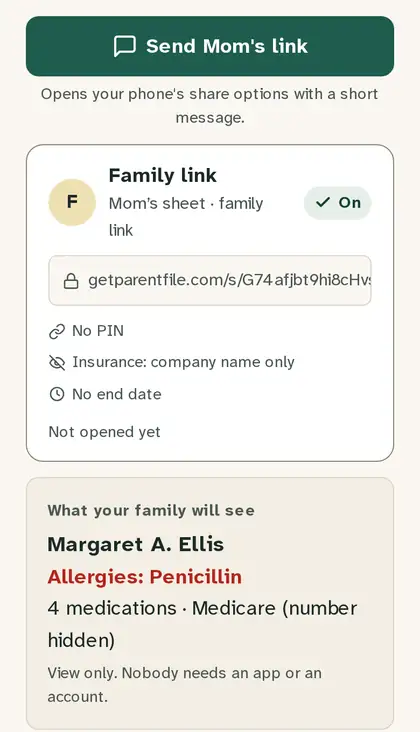
Many family apps ask every relative to install the app and create an account. Often one sibling never does, and that is the one who gets the 11 p.m. call from the hospital. A view-only link or a QR code that opens in any browser removes that step. Our guide on sharing parent care with siblings covers how families split the work.
4. Respect your parent's say
It is your parent's information. A good app lets you control who can see what, hide insurance numbers on shared views, and switch a shared link off. Talk with your parent before you add their details, and agree on who keeps the master copy.
5. Be clear about privacy, in writing
Here is the part many families don't expect: HIPAA usually does not cover an app you choose yourself. HIPAA applies to doctors, hospitals, health plans and their business associates. HHS explains that once health information is sent to a consumer app that is neither of those, at the patient's direction, it is no longer protected by the HIPAA Rules (HHS, 2026 (opens in a new tab)).
Health apps are not unregulated. The FTC's updated Health Breach Notification Rule covers health apps outside HIPAA, and treats sharing health data without permission, for example with advertisers, as a breach that users must be told about (FTC, 2024 (opens in a new tab)). Still, read the privacy policy and look for plain answers to three questions: Is my data sold? Are there ads inside the app? Can I delete everything?
6. Let you take your data with you
Check that you can export everything, at least as a PDF, without paying extra. If the company closes or you stop using it, the medication list you built should not disappear with it.
7. Have a price you understand after year one
"Free" apps often move key features behind a subscription later. Before you invest an evening, find out what happens if you stop paying: do you keep read-only access, a PDF, nothing? Is there a fee per family member?
8. Stay in its lane on medical questions
An organization app should help you record what the doctors and pharmacy said, not replace them. Be cautious with any app that suggests doses or diagnoses. Your parent's pharmacist can review the finished medication list, and our medication list guide explains what it should include.
Can an app read my parent's pill bottles?
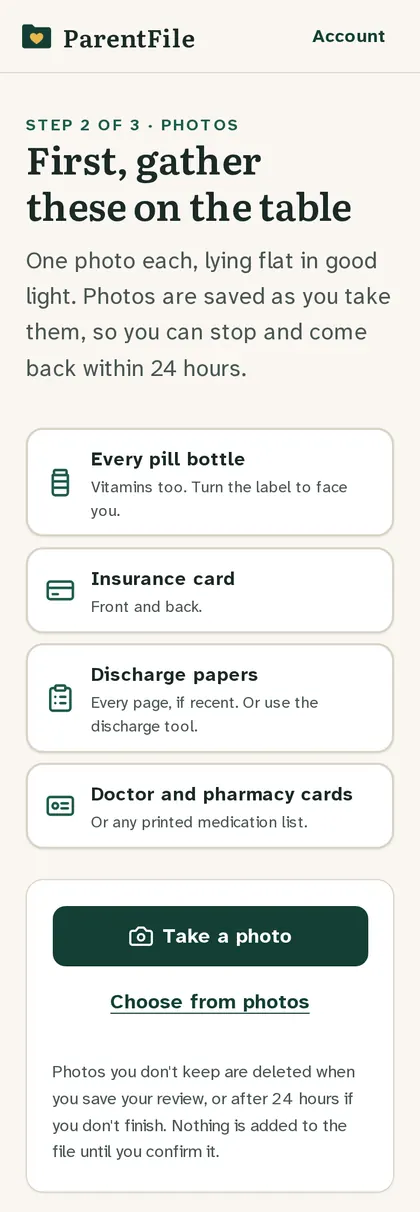
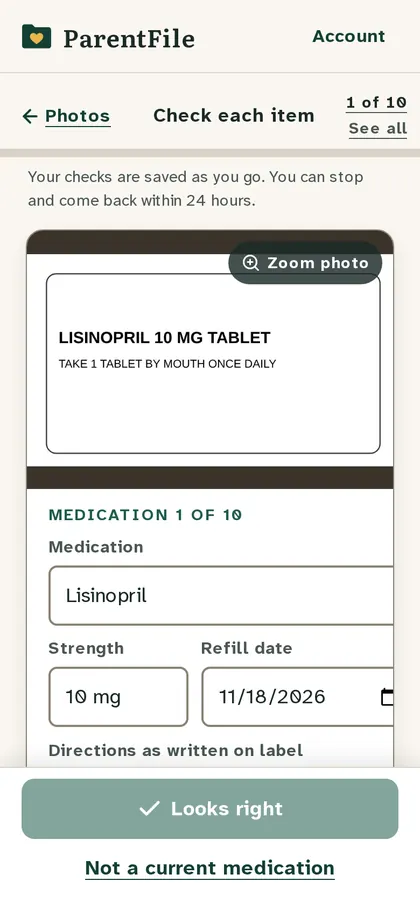
Some can. You photograph the printed pharmacy label, and the app reads the drug name, strength and directions and turns them into a line on the medication list. This saves a lot of typing when a parent has six or more prescriptions.
Two cautions. First, label reading works best on clean, printed pharmacy labels and less well on handwriting, glare or crumpled boxes. Second, nothing read from a photo should go onto an emergency sheet until a person has compared it with the bottle. Treat the result as a draft that you confirm, then ask the pharmacist to check it.
The same check applies after every hospital stay, when medications are often started, changed or stopped. The hospital discharge checklist lists the questions to ask before your parent comes home.
Patient portals: use proxy access, not your parent's password
Many caregivers log in to a parent's patient portal with the parent's own username and password. Federal guidance encourages separate caregiver (proxy) logins instead, because shared logins expose all of the patient's private messages and make it unclear who did what (HealthIT.gov, 2025 (opens in a new tab)). Ask each practice whether it offers proxy access. A caregiver app can sit alongside the portals and pull the important parts onto one page.
Where ParentFile fits
ParentFile is a web app for one job: getting a parent's medical information onto one page the ER can use, and keeping it current for the whole family. You photograph pill bottles, insurance cards and discharge papers; it reads them; you confirm every item next to the photo it came from. It then produces:
- a one-page ER sheet (US Letter or A4) for the fridge and the ER bag
- wallet cards with a QR code that opens the latest version
- a medication list, a documents map (where the power of attorney and advance directive are kept), and a "what changed" view after a hospital discharge
- a view-only link and QR code siblings open in any browser, with no app and no account
What it does not do: it is not a shared calendar or task app, it does not monitor your parent or detect falls, and it does not give medical advice, check interactions or recommend doses. Many families pair it with a shared calendar for rides and visits. The sheet, wallet cards, link and PDF keep working even if you never pay for updates again; pricing is on the kit page.
If you would rather start on paper, our free one-page ER sheet is the same layout, ready to print and fill in by hand.
Printable checklist: comparing caregiver apps
Copy this list and score each app you are considering.
- Built for families (not for home-care agencies or paid aides)
- Solves our main job: coordination / medications / emergency info / records
- Getting information in: typing / portal import / photos of labels
- Every item can be checked and corrected by hand
- Prints a one-page summary for the fridge and the ER
- Wallet card or lock-screen option
- Siblings can view without installing anything or creating an account
- Shared views can hide insurance numbers and be switched off
- Privacy policy says plainly: data not sold, no ads, delete anytime
- Export to PDF included at no extra cost
- Clear price after year 1, and what we keep if we stop paying
- No per-family-member fees
- Does not suggest doses or diagnoses
- Our parent agreed to who can see their information
- We agreed who in the family keeps the master copy
Frequently asked questions
- Is there an app for caregivers of elderly parents?
- Yes, several kinds. Coordination apps share a calendar, tasks and updates between family members. Medication apps track doses and refills. Document apps store records and legal papers. Some apps are built for paid home-care workers rather than families, so check who an app is made for before you download it.
- What is the best caregiver app for families?
- There is no single best one; it depends on the job. If your family mainly needs to split visits and rides, a shared calendar or coordination app fits. If the problem is that nobody can answer "what medications is she on?" in an emergency, pick something that produces a current one-page summary your siblings can open without an account.
- Are caregiver apps covered by HIPAA?
- Usually not. HIPAA covers doctors, hospitals, health plans and their business associates. Once health information goes into an app you chose yourself, HIPAA generally no longer protects it, although the FTC's Health Breach Notification Rule can apply to health apps. Read the app's privacy policy before you add a parent's information.
- Can an app read my parent's pill bottles?
- Some apps can read a photo of a printed pharmacy label and turn it into a medication line. They work best on printed labels and less well on handwriting or crumpled boxes, so you should confirm every line against the bottle and ask the pharmacist to check the finished list.
- Do my siblings need to download the app too?
- With many caregiver apps, yes: each person installs the app and creates an account. If some of your siblings won't, look for an app that can share a view-only link or a printable PDF that opens in any browser.
Sources
- Caregiving in the US 2025, AARP Public Policy Institute and National Alliance for Caregiving
- The access right, health apps, & APIs, U.S. Department of Health and Human Services (HHS), Office for Civil Rights
- Updated FTC Health Breach Notification Rule puts new provisions in place to protect users of health apps and devices, Federal Trade Commission (FTC)
- Patient Engagement Playbook, Chapter 5: caregiver (proxy) access, HealthIT.gov (ASTP/ONC)
Sources checked on October 28, 2026. If you spot something out of date, email support@getparentfile.com.
Not medical or legal advice. ParentFile guides help families get organized. They don't replace a doctor, pharmacist, nurse or lawyer. In an emergency, call 911 (US) or 999 (UK).